Download video with subtitles as one MP4 file
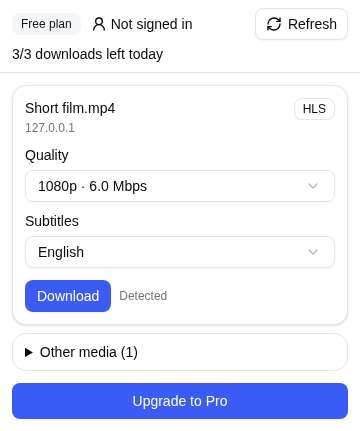
When an HLS or DASH stream has its own subtitles, Kepsy lets you pick one language and embeds it in the MP4 file. You switch the subtitles on in your player like in any film.
Where are the subtitles of an online video?
In many online videos the subtitles are not part of the picture. They are separate text files, usually in the WebVTT format, one file per language, and the player draws them over the picture when you switch them on.
So when a tool fetches only the picture and the sound, the subtitles stay behind.
Why a saved video often has no subtitles
The subtitles and the video are different files on the server. A tool that fetches only the picture and the sound cannot give you subtitles.
Kepsy also fetches the subtitle track you choose and puts it inside the MP4 file as its own track. The subtitles are not burned into the picture, so you can switch them on or off.
How to download with Kepsy
- Open the page with the video and play it for a few seconds so the page loads its playlist.
- Click the Kepsy icon and find the HLS or DASH stream in the list of media.
- Open the “Subtitles” box and choose a language. The box only appears when the stream has its own WebVTT subtitles. Choose “No subtitles” if you do not need them.
- Choose the “Quality”, then click “Download”.
- When the popup says “Saved”, open the MP4 file in a player such as VLC or mpv and switch on the subtitle track.
Limits you should know
- Kepsy embeds one subtitle language in a file. For another language, download again and choose it.
- If the subtitles cannot be fetched, the video is still saved without them, and the popup says “The video was saved without its subtitles.” Reload the page and try again.
- Content with DRM is not supported. Kepsy recognises it and disables the download button. It does not remove DRM.
- A few large platforms are blocked because their terms forbid downloads. A video too large for the browser is refused before the download starts, with a reason.
- The free plan gives 3 downloads a day and needs no account.
FAQ
Why do I not see the “Subtitles” box?
Kepsy shows the “Subtitles” box only when the HLS or DASH stream has its own WebVTT subtitles. Subtitles already drawn into the picture are part of the video and need no choice.
Are the subtitles burned into the picture?
No, Kepsy does not burn subtitles into the picture. The subtitles are a track inside the MP4 file, so you switch them on or off in your player.
Can I embed several languages at once?
Not yet, Kepsy embeds one language per download. For another one, download the video again and choose that language.