Download m3u8 (HLS) video as one MP4 file
Kepsy finds the HLS stream on the page you are watching, lets you pick the quality, and joins every piece into one MP4 file with sound. You never hunt for the m3u8 link or paste it into another website.
What are m3u8 and HLS?
HLS is how many websites play video. Instead of one big file, the video is cut into hundreds of small pieces of a few seconds each. An m3u8 file is the playlist: a text file that tells the player which pieces to fetch, and in which order.
A master playlist can also list several versions of the same video, for example 360p, 720p and 1080p, so the player can choose one that fits the connection.
Why “Save video as…” does not work
An HLS page has no single video file to save. If you save the m3u8 link, you get a text file of a few kilobytes that no player can show.
To get the video, something must fetch every piece, decrypt it if it uses ordinary encryption, and join the pieces in order. Kepsy does this inside your browser, and the file stays on your computer.
How to download with Kepsy
- Open the page with the video and play it for a few seconds. Kepsy only sees media after the page starts to load it. If the popup says “Play a video on the page for the extension to detect it.”, play the video and press “Refresh”.
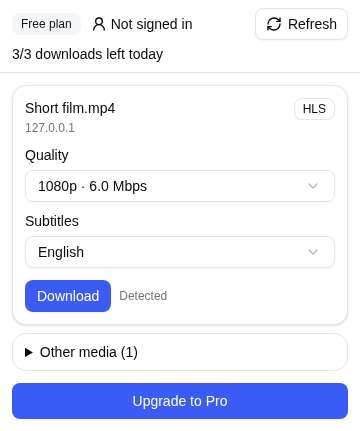
- Click the Kepsy icon. The HLS stream appears in the list of media for the tab.
- Open the “Quality” box and choose a resolution. The list comes from the page’s own playlist.
- If the video has several audio tracks or subtitles, choose “Audio track” and “Subtitles” as you like.
- Click “Download”. The popup shows “Downloading”, then “Muxing”, and at the end “Saved” when the MP4 file is in your Downloads folder.
Limits you should know
- Content with DRM is not supported. Kepsy recognises it and disables the download button. It does not remove DRM. Ordinary AES-128 HLS encryption is decrypted normally because it is not DRM.
- A few large platforms are blocked because their terms forbid downloads. Kepsy detects and downloads nothing there.
- A video too large for the browser is refused before the download starts, with a reason, instead of starting and hanging.
- A live stream that has not ended is not supported.
- The free plan gives 3 downloads a day and needs no account.
FAQ
Do I have to find the m3u8 link myself?
No, you do not have to find the m3u8 link yourself. Kepsy reads the network requests of the open tab and lists the HLS stream for you. Play the video and open the popup.
What about an encrypted m3u8 video?
Kepsy downloads an m3u8 video with ordinary AES-128 encryption: it is decrypted and joined as usual. Content with DRM is not supported, and the popup says so clearly.
What file do I get, and does it have sound?
Kepsy gives you one MP4 file. If the audio is delivered on its own, Kepsy joins both, so the file has sound.